
Digital treatment planning for clinics and labs
Digital treatment planning

Treatment plans by orthodontic specialists. Aligners made by you.

Send your scans and records. BClear's orthodontic team designs the plan, you review every stage in 3D, approve it, and make the aligners in your own clinic or lab.

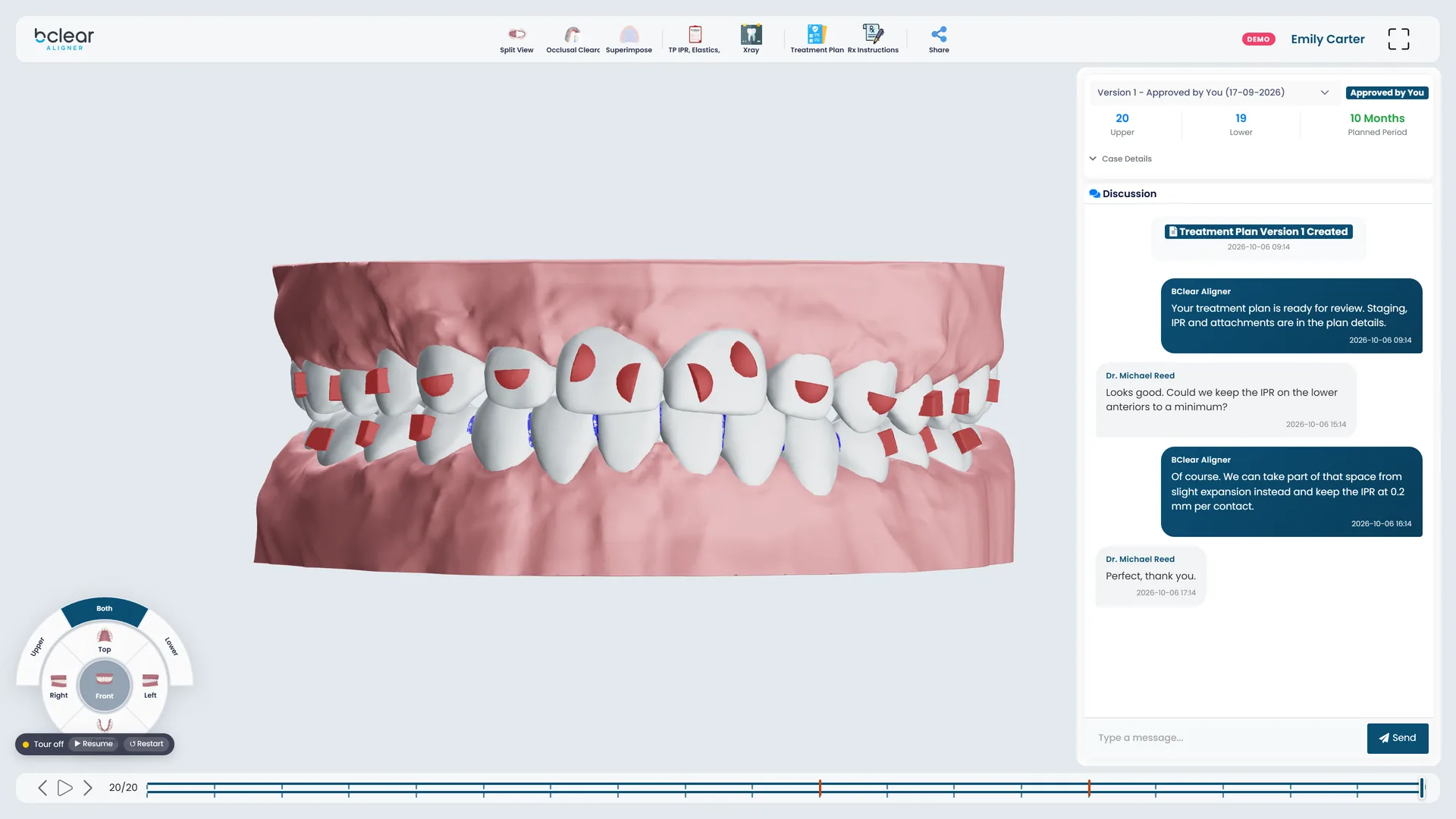
PlanStudio showing a sample case at its final stage: both arches with attachments, the stage timeline, plan details and the discussion with the planner.

What every case gives you

  1. A plan within 3 working daysDesigned by BClear's orthodontic team from your scans and prescription.
  2. Every stage in 3DReview it in PlanStudio, ask for changes, approve it.
  3. IPR, elastics and extractionsThe IPR at every contact, elastics and extractions, in the plan report.
  4. Print-ready STL filesA template plus one file per step, ready for your printer.
Who it is for

Your scanner, your printer, our planners

BClear Rx is for practices and labs that already make appliances in-house, or want to start, and need treatment planning they can trust.

For clinics

Orthodontists and general dentists who make aligners and retainers in the practice.

  • Ultimate plans for orthodontistsA detailed prescription, tooth by tooth.
  • Express plans for general dentistsSix simple goals, from spacing to crossbite.
  • Show patients their planShare the 3D plan with a link, before they commit.
For labs

Dental labs that want to offer aligners to their dentists without an in-house planner.

  • Plans from your own scansSubmit cases for the dentists you work with.
  • One account, your whole teamAdd users to the lab account.
  • Bundles that scaleThe more plans in a bundle, the lower the price per plan.
How it works

From scan to aligners in five steps

Everything happens in the BClear portal: one place for your cases, plans and conversations.

  1. Register

    Open a clinic or lab account and verify your email with a six-digit code.

  2. Submit a case

    Upload intraoral scans, photos and X-rays, then set your prescription and restrictions.

  3. We plan it

    BClear's orthodontic team designs the treatment, stage by stage.

  4. Review and approve

    Play the plan in 3D in PlanStudio. Ask for changes or approve it.

  5. Make the aligners

    Download print-ready STL files for every step and make the aligners in-house.

The full workflow, step by step

PlanStudio

Review every plan as closely as you would plan it

PlanStudio is where you check the plan before anything is made. Approve it when you are happy, or send it back with your changes.

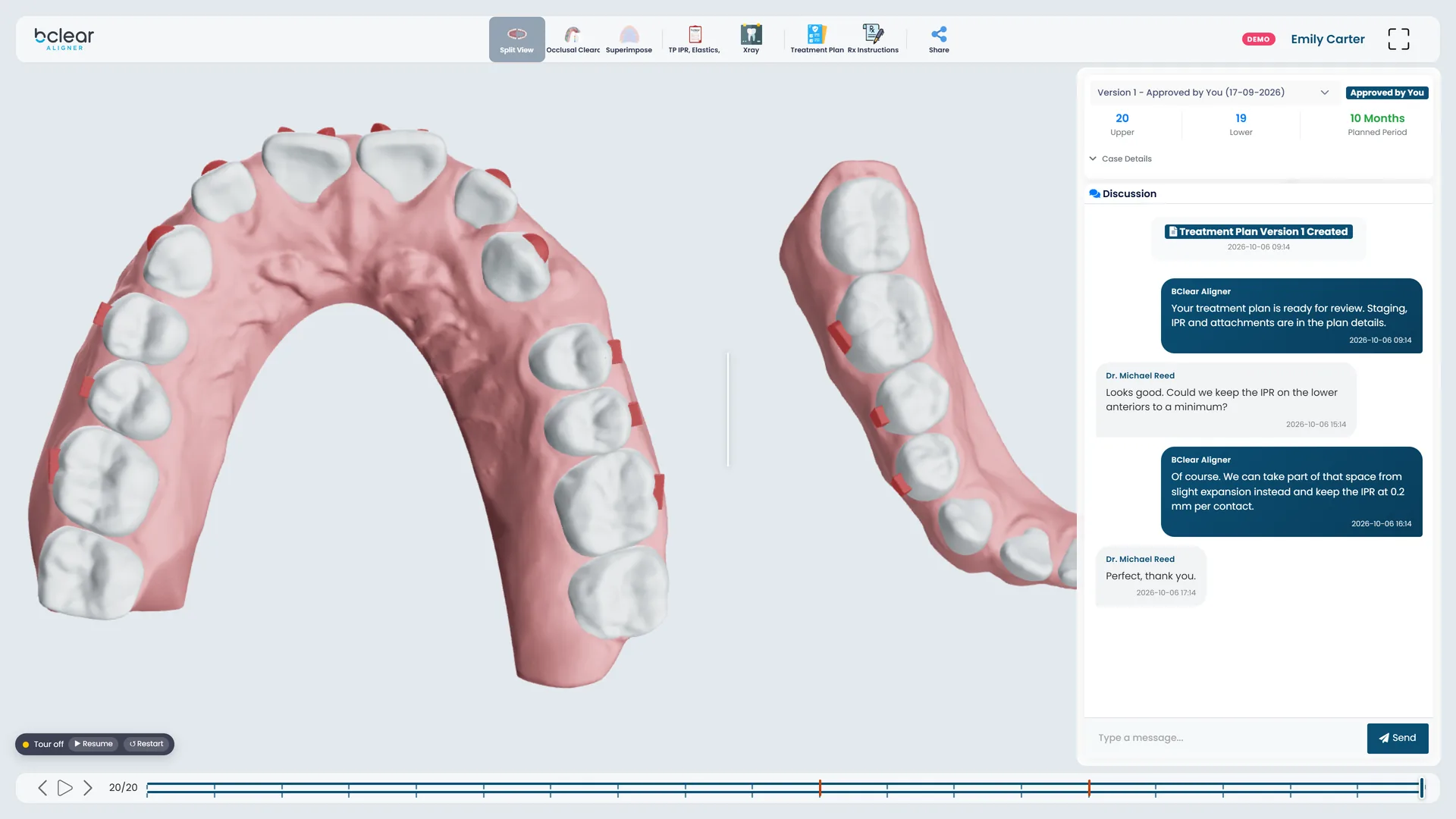
PlanStudio split view: the upper and lower arches of a sample case side by side, with attachments.
Split view: both arches side by side, with every attachment.
  • Stage-by-stage playback

    Play or step through every stage, one arch or both, from five angles.

  • Superimposition and split view

    Lay the first stage over any later one, or see both arches side by side.

  • Occlusal clearance map

    A simulated heat map of how close the arches come at each stage.

  • IPR and elastics chart

    Every interproximal reduction and elastic, tooth by tooth.

  • Discussion on the case

    Talk to the planner in the case, and keep a record of every change.

  • Versions and plan report

    Each revision is a new version. Export the plan report with the IPR and elastics.

All features

Plans and pricing

Prepaid bundles, priced per plan

Buy plans in a bundle and use them across your cases. Larger bundles bring the price per plan down.

For orthodontists

Ultimate

A detailed prescription, with restrictions for teeth to extract, teeth that must not move and teeth without attachments.

For general dentists

Express

A quicker path for simpler cases. Keep or improve six things (spaces, crowding, midline, overjet, overbite and anterior crossbite) and the planners handle the detail.

Ready to send your first case?

Create your account in a few minutes. Verify your email, choose a bundle, and upload your first scans.